Come rimuovere gli annunci da Spotify senza Premium

postato su -01-01 to Scarica musica Spotify
Spotify è ben accolto in tutto il mondo. È un servizio freemium. Anche se sei un utente Spotify Free, puoi accedere alla sua intera libreria musicale. In altre parole, se hai una rete stabile e non sei esigente riguardo alla qualità dell'audio, non è necessario eseguire l'aggiornamento alla versione Premium. Tuttavia, potresti essere infastidito dagli annunci inseriti di frequente tra le tracce. Gli annunci interrompono l'ascolto e di solito si traducono in un'esperienza musicale spiacevole. C'è un modo per bloccare gli annunci su Spotify senza Premium? La risposta è positiva. Che tu sia un utente Windows, Mac, Android o iPhone, c'è sempre un modo per aiutarti a sbarazzarti degli annunci pubblicitari da Spotify.
Metodo 1. Disattiva automaticamente gli annunci
Il principio di un'app per la disattivazione automatica degli annunci consiste nel disattivare il volume multimediale ogni volta che rileva che Spotify sta riproducendo un annuncio. Puoi continuare ad ascoltare la musica dopo la fine degli annunci. I rappresentanti tipici sono SpotMute, Mutify e EZBlocker. SpotMute e Mutify sono disponibili per utenti Android e EZBlocker è disponibile per utenti Windows e Mac.
Metodo 2. Blocco annunci
Il principio di un ad-blocker è bloccare direttamente gli annunci. Ti aiuterà a filtrare gli annunci una volta installati e completati con alcune impostazioni richieste. Il tipico rappresentante è StopAd, disponibile su Windows, Mac, Android e iPhone.
Metodo 3. Ottieni la versione Mod di Spotify
La versione Mod di Spotify offre alcune funzionalità gratuitamente, come un'esperienza di ascolto musicale senza pubblicità. Se vuoi provare questo metodo, ti consigliamo di richiedere un nuovo account Spotify per evitare la sospensione dell'account.
Metodo 4. Modifica file host
Il principio è sfruttare gli URL degli annunci di Spotify e bloccare gli annunci nel file host del tuo sistema. Puoi sfogliare la libreria musicale su Spotify e ascoltare i brani di Spotify normalmente.
Method 5. Pay for the service
The best and the easiest way is to upgrade to Premium. In this way, you can not only remove ads but also stream Spotify songs offline, play any song you want with unlimited skips, and more.
Method 6. Remove Ads from Spotify without Upgrade
The method we are going to introduce below is completely different from the ones mentioned above. It's elementary, easy-to-follow, and 100% working. The principle of it is to download ad-free Spotify songs with a Spotify Free account. Without further ado, let's get more details.
Tool Required – Free Spotify Music Downloader
Free Spotify Music Downloader is compatible with Windows and Mac OS. No matter you are a Spotify Free user or a Premium subscriber, you can use it to download tracks from Spotify as MP3/AAC/WAV/FLAC/AIFF/ALAC/AUTO files.
How to Use Free Spotify Music Downloader to Get Ad-free Spotify Songs?
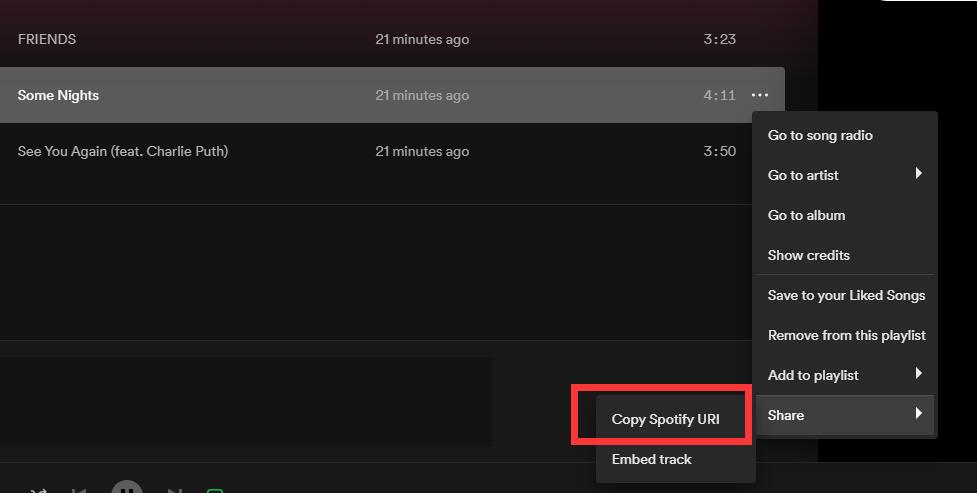
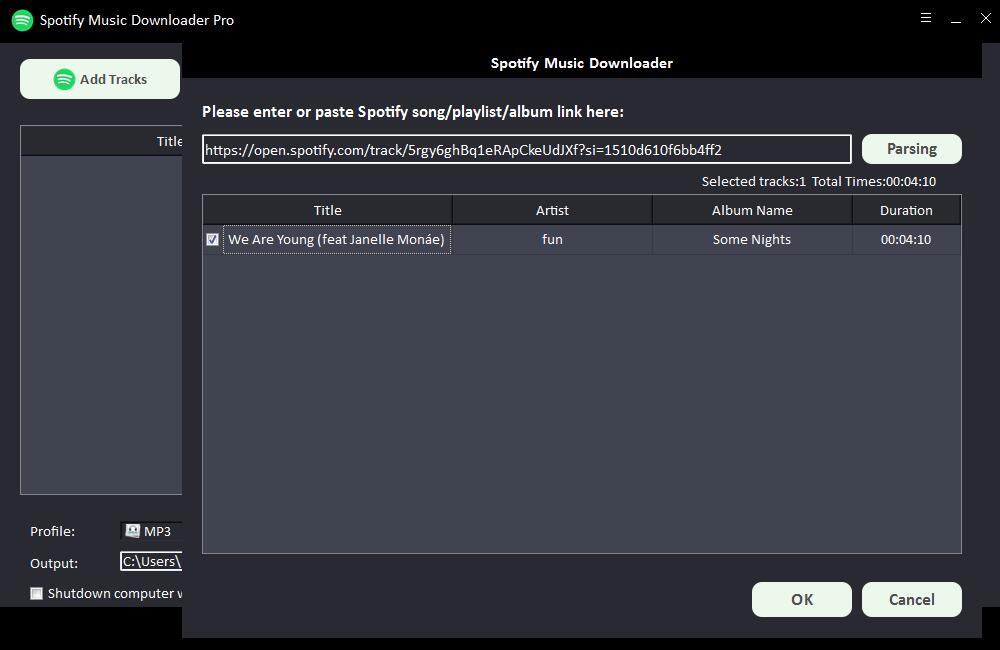
Step 1: Click "Add Tracks" button. Copy and paste the URL of the Spotify song into the box on Free Spotify Music Downloader and then click "Parsing" button to continue.
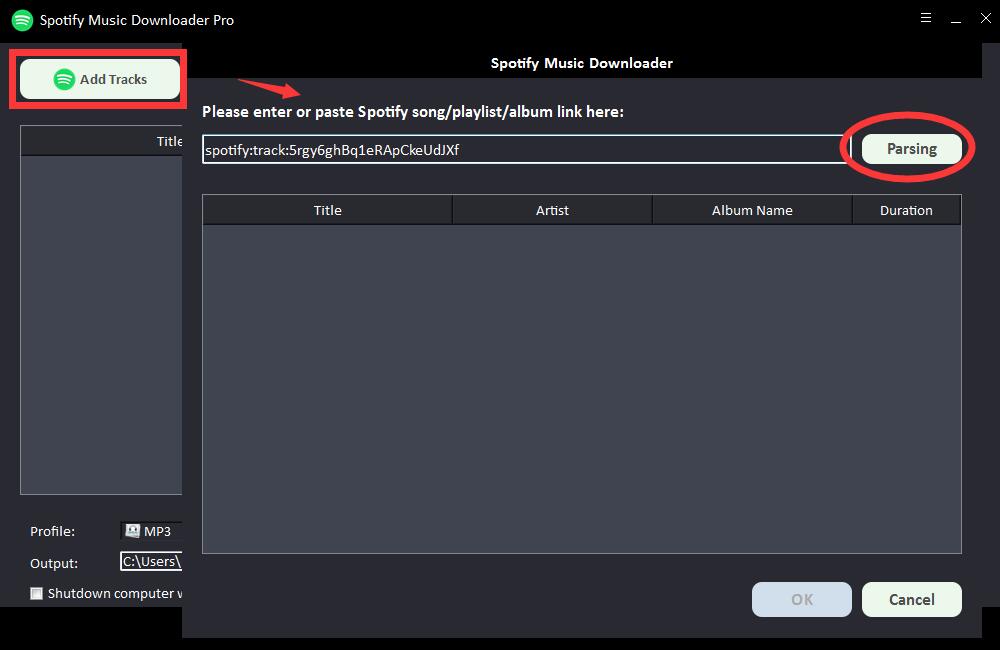
After a short while, all the information about the Spotify song will be displayed, such as Title, Artist, Album Name and Duration. Click "OK" to confirm and go to next step.
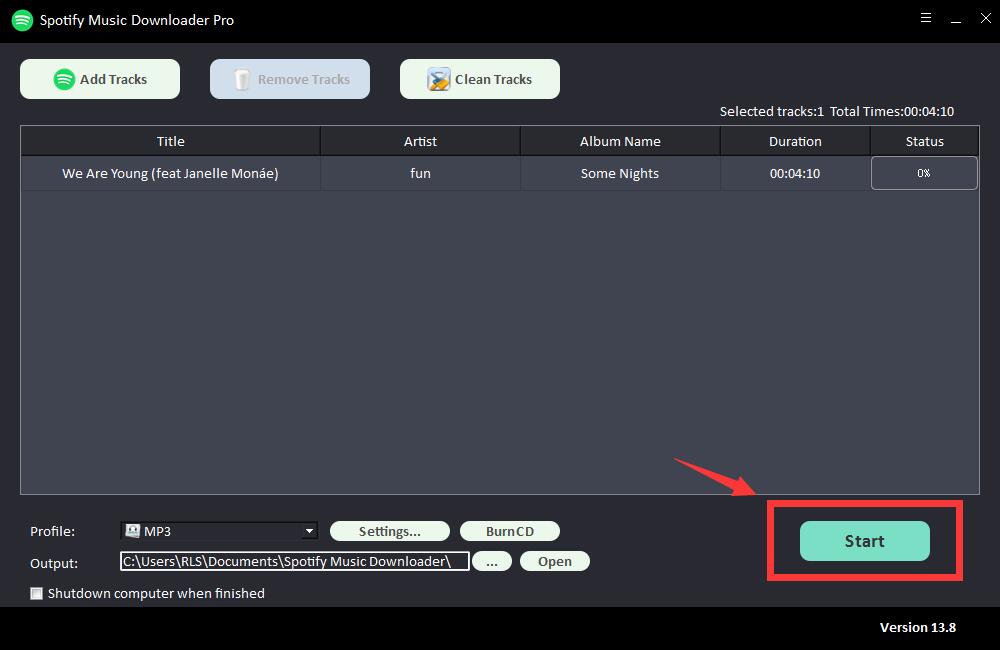
Step 2: Select output audio format from "Profile" drop-down list or you can click "Settings" to change Bit Tate and Sample Rate.
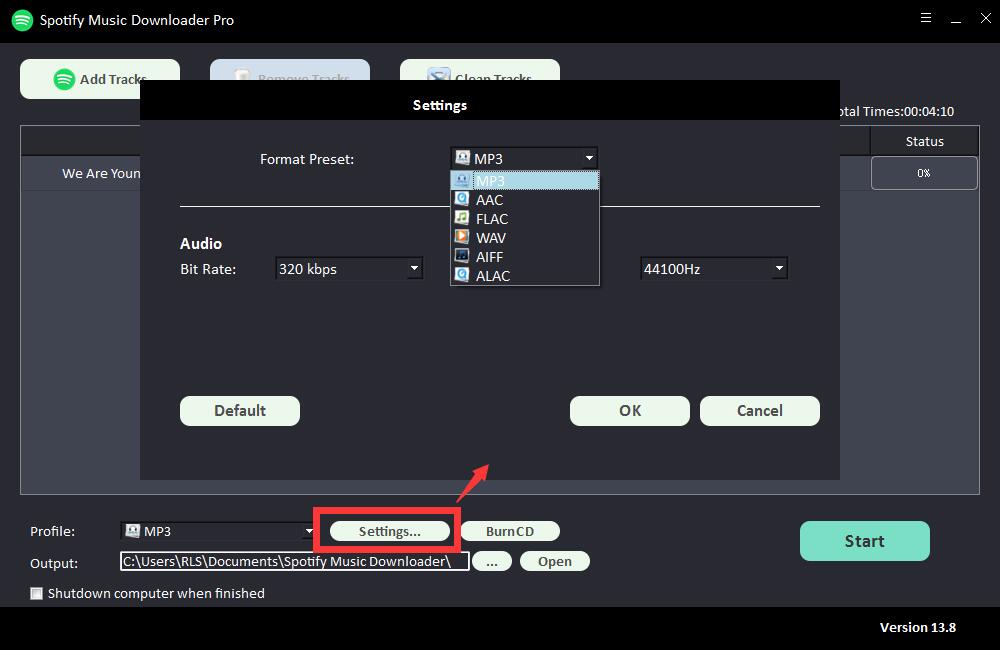
Step 3: Choose output destination and then click "Start" and it will start to download and convert Spotify songs, playlists, albums and Podcasts to MP3, AC, FLAC, WAV, AIFF, ALAC, AUTO and other common audio files.